
Most businesses don't have a people problem. They have a time problem.
Teams spend hours answering the same customer questions, updating spreadsheets, following up with leads, moving information between tools, and doing small administrative tasks that have to be done but don't really need a person's full attention.
This is where AI automation is becoming useful in 2026.
The goal isn't to replace your team with AI. It's to take repetitive work off their plate so they can spend more time on customers, strategy, sales, and decisions that actually need human judgment.
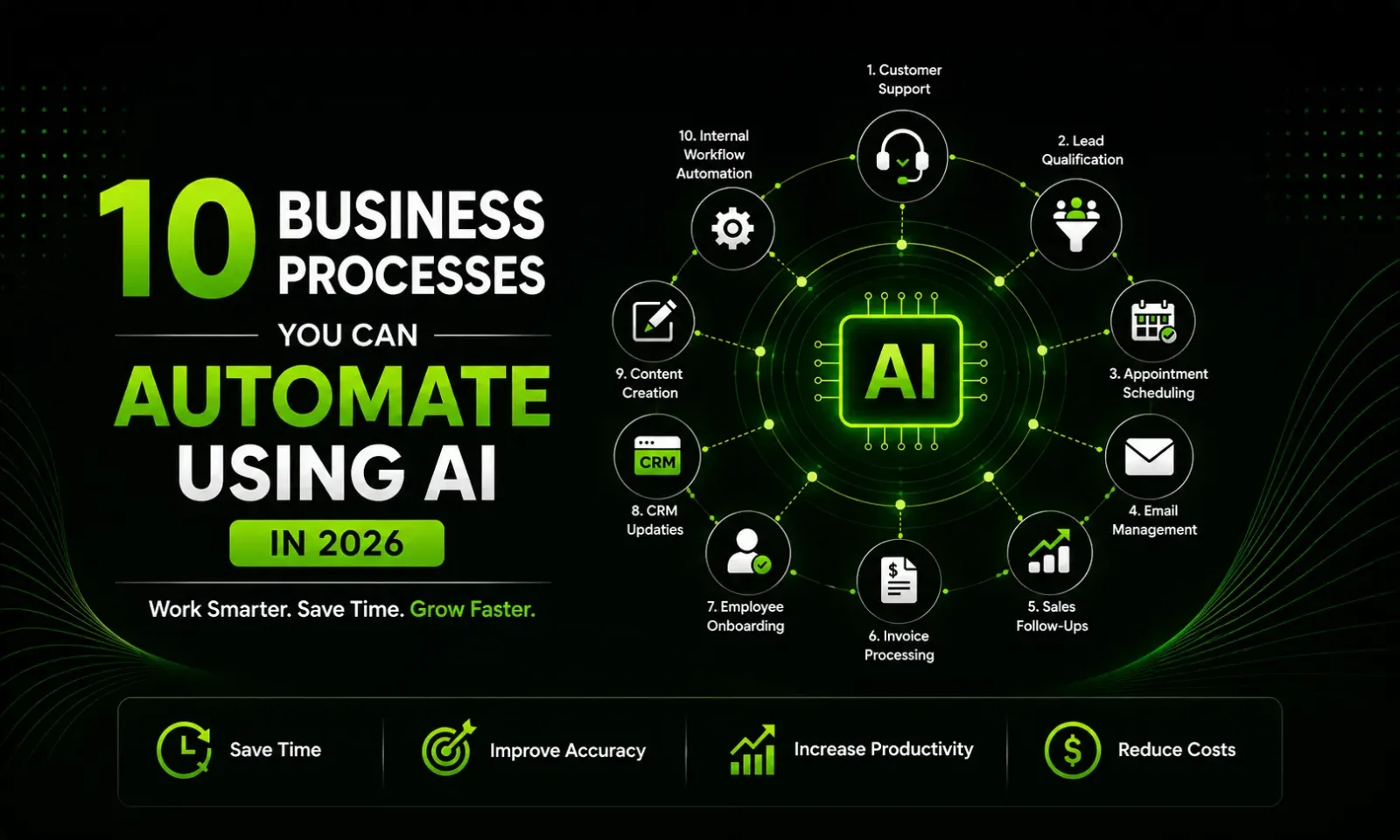
Here are 10 business processes worth looking at.
1. Customer Support
Think about the questions your support team answers every single day.
What are your working hours?
Where is my order?
How can I reschedule my appointment?
Do you provide this service?
These questions may be simple, but answering them repeatedly takes real time.
An AI customer support agent can handle these conversations instantly. It can understand what the customer is asking, search your approved information, provide an answer, and hand the conversation to a human when the situation gets complicated.
The important part is the handoff. Good automation doesn't trap customers in a bot. It knows when a real person needs to step in.
For businesses receiving inquiries outside working hours, this can also mean fewer unanswered customers and faster first responses.
Best suited for: E-commerce, agencies, clinics, service businesses, SaaS companies, and local businesses.
2. Lead Qualification
Getting more leads sounds great until your sales team has to manually check every single one.
Some leads are ready to buy. Some are just researching. Others may not even need what you sell.
Instead of making your sales team figure this out manually, AI can handle the first conversation.
For example, someone fills out your website form. An AI agent can ask what they need, their approximate budget, timeline, company size, or other relevant questions. It can then categorize the lead and send the important ones to your sales team.
Your salesperson starts the conversation with context instead of starting from zero.
That's a small change, but across hundreds of leads, it can save a surprising amount of time.
Best suited for: Agencies, real estate, B2B companies, consultants, SaaS businesses, and high-ticket services.
3. Appointment Scheduling
Scheduling a meeting shouldn't require six emails.
Yet it often does.
Someone asks for a meeting. You suggest a time. They aren't available. They suggest another time. You check your calendar again. Eventually, everyone agrees.
AI can remove most of this back-and-forth.
An AI assistant can check available slots, understand the customer's preferred timing, book the appointment, send confirmation, and handle rescheduling when necessary.
It can also send reminders before the appointment, which helps reduce no-shows.
The result isn't just convenience. Your team gets back the small pieces of time that are normally lost throughout the day.
Best suited for: Clinics, consultants, agencies, salons, coaches, real estate businesses, and professional services.
4. Email Management
Email can quietly consume a huge part of the working day.
The problem isn't always the number of emails. It's the number of small decisions attached to them.
Which ones are urgent?
Which ones are sales opportunities?
Which ones can wait?
Which ones need a reply?
AI can help with this first layer of organization.
It can classify incoming messages, summarize long conversations, extract important information, draft responses, and highlight emails that actually require human attention.
For example, an invoice can automatically be identified as a finance-related message, while a new pricing inquiry can be flagged for the sales team.
You still decide what gets sent. AI simply reduces the amount of sorting and repetitive writing involved.
5. Sales Follow-Ups
This one can directly affect revenue.
A surprising number of sales opportunities don't disappear because the customer said no. They disappear because nobody followed up.
A proposal gets sent. The prospect gets busy. The salesperson gets busy. A week passes. Then two weeks.
AI-powered workflows can make follow-up consistent.
When a proposal is sent, the system can schedule a follow-up. If the prospect replies, the workflow can stop. If they ask a question, it can notify the salesperson. If there is no response, another appropriate follow-up can be triggered later.
The important thing is personalization.
A useful follow-up should reference the actual conversation, not sound like a mass email sent to 500 people.
AI can help create that context while automation handles the timing.
6. Invoice and Document Processing
Nobody starts a business because they love entering invoice data into spreadsheets.
But someone still has to do it.
AI can read invoices, receipts, purchase orders, and similar documents and extract information such as vendor names, invoice numbers, dates, taxes, totals, and line items.
That information can then be passed into the appropriate accounting or business system.
A human can remain responsible for approval, especially when money is involved. AI simply handles the boring extraction work beforehand.
For companies processing hundreds or thousands of documents, this can make a significant difference.
The value here is simple: less data entry, fewer repetitive tasks, and more consistent records.
7. Employee Onboarding
A new employee usually has the same questions as every other new employee.
Where can I find this document?
How do I request leave?
Which tools do I need access to?
Who should I contact about this?
HR shouldn't have to answer the same questions every time someone joins.
An AI onboarding assistant can provide employees with instant access to approved company information. It can also remind them about pending documents, training, policies, and other onboarding tasks.
This doesn't replace HR.
It gives HR more time to focus on the things that actually require a human touch.
For growing companies, that difference becomes more noticeable as the team gets larger.
8. CRM Updates and Sales Administration
Salespeople are hired to sell, not spend their evenings updating CRM records.
But after every call, someone needs to record what happened.
What did the customer want?
What objections did they have?
When are they planning to buy?
What should happen next?
AI can turn a sales conversation into a structured summary and identify important details automatically.
With the right integrations, those details can be pushed into the CRM and used to create follow-up tasks.
This also gives managers better visibility into the pipeline.
Instead of relying on incomplete notes, they can see what is actually happening across active opportunities.
It's one of those automations that doesn't look exciting on a demo but can save a sales team hours every week.
9. Content and SEO Workflows
AI has changed how businesses approach content, but there is an important distinction between using AI to create content and using AI to improve a content workflow.
The second approach is usually more useful.
AI can help research topics, organize keywords, create outlines, repurpose existing content, generate initial drafts, write product descriptions, and turn one piece of content into multiple formats.
For example, a detailed blog post could become a LinkedIn post, newsletter, short video script, FAQ section, and several social media ideas.
But pressing a button and publishing whatever AI produces isn't a strategy.
Businesses still need original insights, fact-checking, editing, brand knowledge, and a clear understanding of their audience.
AI should speed up the process, not remove the thinking behind it.
10. Connecting Your Business Tools
This is where AI automation can become particularly powerful.
Most businesses use several tools.
A website collects leads.
A CRM stores customers.
Email handles communication.
Accounting software manages payments.
A calendar manages meetings.
The problem is that these systems don't always work together automatically.
So people become the connection between them.
Someone copies a lead from a website into the CRM. Someone sends the confirmation email. Someone creates a task for the salesperson. Someone updates the spreadsheet.
That is a lot of manual work.
Automation can connect these systems.
Imagine this:
A customer fills out your website form → AI understands the inquiry → the lead is added to your CRM → the right salesperson is notified → the customer receives an acknowledgment → a follow-up task is created.
Nobody has to copy and paste anything.
And this is only one example.
Once businesses start mapping their workflows, they often discover dozens of similar opportunities.
Don't Automate Everything
There is a common mistake businesses make when they first discover AI automation.
They try to automate everything.
That's usually the wrong approach.
Start with one process.
Look for something that happens frequently, takes a lot of manual effort, and follows a reasonably predictable workflow.
Then measure the result.
Maybe your team spends 15 hours a week qualifying leads. Maybe customer support receives 300 repetitive questions every month. Maybe salespeople spend hours updating CRM records.
Those are much better automation opportunities than trying to build an AI system simply because AI is trending.
The Human Side Still Matters
AI can process information quickly, but businesses are still built around people.
Customers sometimes want empathy.
Employees need judgment.
Sales conversations can be complicated.
Important financial decisions need oversight.
And some problems simply don't fit neatly into a predefined workflow.
The best AI systems understand this.
They automate the repetitive parts and leave the important decisions to humans.
That's where the real value comes from.
Final Thoughts
AI automation in 2026 isn't really about having the most advanced AI tool.
It's about finding the right work to automate.
A small workflow that saves your team five hours every week can be more valuable than an expensive AI system that looks impressive but solves no real problem.
Start by looking at your business from the inside.
What task does someone repeat every day?
Where are people copying information from one system to another?
Which customer questions keep appearing?
Where do leads get forgotten?
Which process slows your team down?
Those questions will usually reveal your best automation opportunities.
The future of business automation isn't about removing humans from the process. It's about removing unnecessary work from humans.
Want to Automate Your Business?
If you're spending too much time on repetitive tasks, manual follow-ups, data entry, or managing the same processes again and again, AI automation could help.
At Softlyx Technologies, we help businesses build practical automation systems using AI agents, workflow automation, CRM automation, AI integrations, voice AI, and business automation.
Not sure what you should automate first? That's okay.
Tell us how your business currently works, and we'll help you identify processes where AI automation can genuinely save time and reduce manual work.
Ready to explore what's possible? Talk to Softlyx Technologies →
Let's find the right automation opportunity for your business.


Comments (0)
Be the first to comment.